
In an era where technology is rapidly evolving, virtual reality (VR) has emerged as a powerful tool for education. As a learning cards supplier, I've witnessed firsthand the transformative potential of VR in enhancing the learning experience. In this blog, I'll share how to make learning cards for VR, offering insights and practical steps to create engaging and effective educational resources.
Understanding the Basics of VR Learning Cards
Before diving into the creation process, it's essential to understand what VR learning cards are and why they are valuable. VR learning cards are digital cards designed to be used in a virtual reality environment. They can contain various types of information, such as text, images, videos, and audio, and are used to teach a wide range of subjects, from language learning to science and history.
The benefits of using VR learning cards are numerous. They provide an immersive learning experience that can increase engagement and retention. VR allows learners to interact with the content in a more hands - on way, making the learning process more enjoyable and effective. Additionally, VR learning cards can be easily customized to meet the specific needs of different learners, making them a versatile educational tool.
Step 1: Define Your Learning Objectives
The first step in making VR learning cards is to define your learning objectives. What do you want learners to achieve by using these cards? Are you teaching a new language, basic math concepts, or historical events? Clearly defining your learning objectives will help you determine the content and format of your cards.
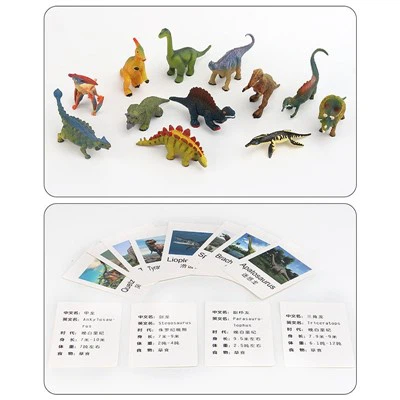
For example, if you're creating Animal Learning Cards for young children, your learning objectives might include teaching them the names of different animals, their habitats, and basic facts about them. Based on these objectives, you can decide what information to include on each card, such as high - quality images of the animals, their names in different languages, and short descriptions of their characteristics.
Step 2: Choose the Right Content
Once you have defined your learning objectives, it's time to choose the right content for your VR learning cards. The content should be relevant, accurate, and engaging. It should also be presented in a way that is easy to understand, especially for the target audience.
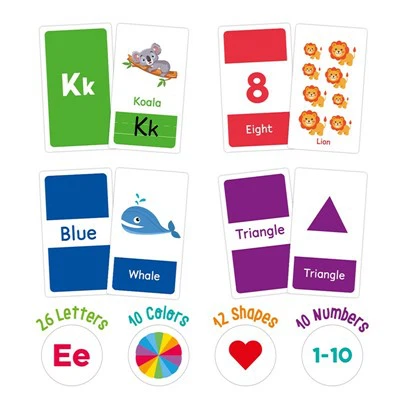
For language learning, Basic Phonics Flashcards can be a great option. You can include letters, sounds, and simple words on the cards, along with audio recordings of the correct pronunciation. For science learning, you might include detailed diagrams, videos of scientific experiments, and explanations of key concepts.
When choosing content, consider using a variety of media formats. Images can help learners visualize the information, videos can provide dynamic demonstrations, and audio can enhance the learning experience by providing additional explanations or examples.
Step 3: Design the Card Layout
The layout of your VR learning cards is crucial for their effectiveness. A well - designed layout can make the information easy to read and understand, while a poorly designed layout can be confusing and off - putting.
Start by choosing a clear and simple color scheme. Avoid using too many bright or clashing colors, as this can be overwhelming for the learner. Use a font that is easy to read, even in a VR environment.
Organize the content on the card in a logical way. For example, if you're creating a card with an image and a description, place the image at the top and the description below it. You can also use headings and sub - headings to break up the content and make it easier to scan.
Step 4: Develop the VR Experience
Once you have designed the cards, it's time to develop the VR experience. This involves creating a virtual environment where the cards can be accessed and interacted with.
There are several VR development platforms available, such as Unity and Unreal Engine. These platforms allow you to create 3D environments, add objects, and program interactions. You can use these platforms to create a virtual classroom, a museum, or any other environment that is relevant to your learning objectives.
In the VR environment, you can arrange the learning cards in a way that makes sense. For example, you can create a virtual bookshelf where learners can browse through the cards, or you can place the cards in a virtual room where learners can walk around and interact with them.


Step 5: Test and Refine
After developing the VR learning cards and the associated VR experience, it's important to test them. You can test the cards with a small group of learners to get feedback on their usability, effectiveness, and engagement.
Pay attention to how learners interact with the cards. Do they find the content easy to understand? Are they able to navigate the VR environment without any problems? Based on the feedback, you can make adjustments to the cards and the VR experience.
For example, if learners find the text on the cards too small, you can increase the font size. If they have trouble navigating the VR environment, you can add more visual cues or instructions.
Step 6: Market and Distribute Your VR Learning Cards
Once you have created and refined your VR learning cards, it's time to market and distribute them. You can target schools, educational institutions, and individual learners.
Create a website or an online store where you can showcase your VR learning cards. Provide detailed information about the cards, including their features, learning objectives, and pricing. You can also offer free samples or trials to attract potential customers.
Use social media and online advertising to promote your VR learning cards. Share engaging content, such as videos of the VR experience, testimonials from satisfied customers, and educational resources related to the cards.
Conclusion
Making learning cards for VR is an exciting and rewarding process. By following the steps outlined in this blog, you can create engaging and effective educational resources that can enhance the learning experience in a virtual reality environment.
As a learning cards supplier, I'm committed to providing high - quality VR learning cards that meet the diverse needs of learners. If you're interested in purchasing our VR learning cards or have any questions about the creation process, please feel free to contact us for a procurement discussion.
References
- Clark, R. C., & Mayer, R. E. (2016). E - learning and the science of instruction: Proven guidelines for consumers and designers of multimedia learning. Pfeiffer.
- Dede, C. (2009). Immersive interfaces for engagement and learning. Science, 323(5910), 66–69.
- Squire, K. D. (2011). Video games and learning: Teaching and participatory culture in the digital age. Teachers College Press.