
As a supplier of PVC Entertainment Cards, I understand the importance of having the right software to design these cards. In this blog post, I will explore some of the best software options available for designing PVC Entertainment Cards, including their features, pros, and cons.
Adobe Photoshop
Adobe Photoshop is a widely recognized and powerful graphic design software that offers a comprehensive set of tools for creating high - quality designs. It is suitable for both beginners and advanced designers.
Features:
- Layers: Photoshop allows you to work with multiple layers, which is extremely useful when designing PVC Entertainment Cards. You can separate different elements such as images, text, and graphics onto individual layers, making it easier to edit and adjust each component independently.
- Image Editing: It provides a wide range of image editing capabilities, including color correction, resizing, and retouching. You can enhance the quality of your card designs by adjusting the brightness, contrast, and saturation of images.
- Custom Brushes and Shapes: There is a vast library of custom brushes and shapes that you can use to add unique elements to your designs. You can also create your own brushes and shapes to give your PVC Entertainment Cards a distinct look.
- Text Editing: Photoshop offers advanced text editing features, such as different fonts, styles, and effects. You can create eye - catching text for your card titles, captions, and other information.
Pros:
- Industry Standard: It is the industry standard for graphic design, so there are numerous tutorials and resources available online. You can easily find help and inspiration for your PVC Entertainment Card designs.
- Compatibility: Photoshop files can be easily shared and opened by other designers, printers, or software applications. This ensures seamless collaboration throughout the design and production process.
- Versatility: It can be used for a variety of design projects, not just PVC Entertainment Cards. You can also use it for creating logos, banners, and other marketing materials.
Cons:
- Cost: Adobe Photoshop is a paid software, and the subscription cost can be relatively high, especially for small businesses or individuals on a tight budget.
- Steep Learning Curve: The software has a large number of features, which can be overwhelming for beginners. It may take some time to master all the functions and tools.
CorelDRAW
CorelDRAW is another popular graphic design software that is well - suited for designing PVC Entertainment Cards.
Features:


- Vector Graphics: CorelDRAW specializes in vector graphics, which means that your designs can be scaled to any size without losing quality. This is crucial for PVC Entertainment Cards, as they may need to be printed in different sizes.
- Precise Drawing Tools: It offers a variety of precise drawing tools, such as the pen tool, shape tools, and freehand drawing tools. These tools allow you to create detailed and accurate designs.
- Color Management: CorelDRAW has advanced color management features, which ensure that the colors in your designs match the colors on the printed PVC Entertainment Cards.
- Template Library: There is a large template library available, which can be a great starting point for your card designs. You can customize these templates to suit your specific needs.
Pros:
- User - Friendly Interface: CorelDRAW has a more intuitive and user - friendly interface compared to some other design software. It is easier for beginners to learn and use.
- Affordable: It is more affordable than Adobe Photoshop, especially for small businesses and individuals.
- Print - Ready Output: The software is optimized for print, which means that your designs are more likely to look great when printed on PVC material.
Cons:
- Limited Online Resources: Compared to Adobe Photoshop, there are fewer online tutorials and resources available for CorelDRAW. This may make it a bit more challenging for beginners to learn the software.
- Compatibility Issues: There may be some compatibility issues when sharing CorelDRAW files with other software applications.
Inkscape
Inkscape is a free and open - source graphic design software that can be used for designing PVC Entertainment Cards.
Features:
- Vector Graphics: Similar to CorelDRAW, Inkscape is based on vector graphics, which allows for high - quality and scalable designs.
- Extensive Toolset: It offers a wide range of tools for drawing, editing, and manipulating shapes, lines, and text. You can create complex and detailed designs using these tools.
- Plugin Support: Inkscape has a large number of plugins available, which can extend its functionality. For example, you can find plugins for adding special effects, generating patterns, and more.
Pros:
- Free: The fact that Inkscape is free makes it an attractive option for small businesses and individuals with limited budgets.
- Open - Source Community: There is a large open - source community behind Inkscape, which means that you can find a lot of support and resources online. You can also contribute to the development of the software.
- Cross - Platform Compatibility: Inkscape is available for Windows, Mac, and Linux, which makes it accessible to a wide range of users.
Cons:
- Lack of Some Advanced Features: Compared to paid software like Adobe Photoshop and CorelDRAW, Inkscape may lack some advanced features. For example, its image editing capabilities are not as powerful as those in Photoshop.
- Learning Curve: Although it has a relatively user - friendly interface, there is still a learning curve, especially for those who are new to graphic design.
Canva
Canva is a user - friendly online graphic design platform that is great for creating PVC Entertainment Cards, especially for those who are not professional designers.
Features:
- Template Gallery: Canva has a vast template gallery with a wide variety of card designs. You can choose a template that suits your style and customize it to your needs.
- Drag - and - Drop Interface: The platform has a simple drag - and - drop interface, which makes it easy to add images, text, shapes, and other elements to your designs.
- Collaboration Tools: Canva allows you to collaborate with team members or clients in real - time. You can share your designs and get feedback from others.
Pros:
- Easy to Use: Canva is extremely easy to use, even for those with no prior design experience. You can create professional - looking PVC Entertainment Cards in a short amount of time.
- Affordable Pricing Plans: Canva offers both free and paid plans. The paid plans provide access to more features and resources, but the free plan is still quite useful for basic designs.
- Mobile App: Canva has a mobile app, which allows you to design on the go. You can create and edit your PVC Entertainment Card designs from your smartphone or tablet.
Cons:
- Limited Customization: Compared to professional design software like Adobe Photoshop and CorelDRAW, Canva has some limitations in terms of customization. You may not be able to create highly complex or unique designs.
- Dependence on Internet Connection: Since Canva is an online platform, you need a stable internet connection to use it. This can be a problem if you are in an area with poor internet access.
Conclusion
When it comes to designing PVC Entertainment Cards, there are several software options available, each with its own set of features, pros, and cons. If you are a professional designer or have a large budget, Adobe Photoshop or CorelDRAW may be the best choices, as they offer advanced features and high - quality output. If you are on a tight budget or are new to graphic design, Inkscape or Canva can be great alternatives.
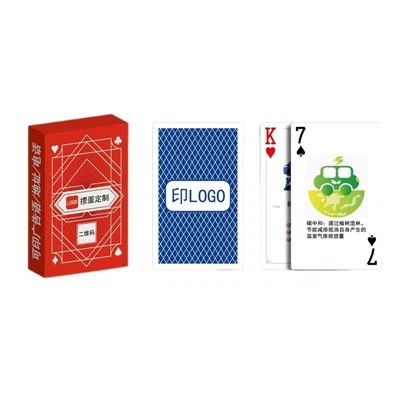
As a PVC Entertainment Cards supplier, we offer a wide range of products, including PVC Bridge Poker, PVC Texas Hold'em, and PVC Gift Playing Cards. If you are interested in purchasing our PVC Entertainment Cards or have any questions about the design process, please feel free to contact us for further discussion and negotiation.
References
- Adobe Photoshop official documentation
- CorelDRAW official documentation
- Inkscape official documentation
- Canva official website